-1770899844.png)
What Is the Starlink Standard Actuated Kit
BackWhat Is the Starlink Standard Actuated Kit ? A Complete Guide for Kenya

Reliable internet in Kenya has stopped being a “nice-to-have” and has become something people depend on every day. Households need stable connectivity for remote work, online classes, streaming, and staying connected with family. Businesses rely on internet for payments, customer support, cloud systems, CCTV monitoring, inventory tools, marketing, and communication. Even essential services like healthcare and education increasingly depend on online platforms for records, training, coordination, and service delivery. In short, internet reliability now affects productivity, income, learning outcomes, and even basic convenience.
At the same time, many Kenyans still face real connectivity frustrations. In some areas, fiber is available but not always dependable. A single fiber cut can take down service for hours or even days, affecting entire neighborhoods or business districts. In other places, fiber simply hasn’t reached yet, so people depend on mobile networks. While 4G and 5G have expanded, mobile internet can slow down significantly during peak hours, become unstable indoors, or fluctuate depending on tower capacity, weather, and network congestion. For rural and remote areas, coverage gaps still exist — meaning some communities experience weak signals, slow speeds, or no usable connection at all.
That’s why Starlink has been gaining attention in Kenya. Starlink offers satellite internet that doesn’t rely on local cables or nearby towers. Instead, it connects to satellites in low Earth orbit, providing broadband service in many places where traditional infrastructure struggles. For users who are tired of unpredictable outages, slowdowns, and limited coverage, Starlink feels like a new option that actually matches modern internet needs — especially for people living outside major towns, businesses that can’t afford downtime, and institutions operating in remote regions.
Within the Starlink ecosystem, one kit has become especially important: the Starlink Standard Actuated Kit. This is the commonly deployed hardware package designed for everyday home and small business use. The key feature is in the name: “actuated.” It means the dish has built-in motors and smart control that allow it to align itself automatically. Instead of manually aiming a dish and hoping it stays correct, the system powers on, scans the sky, positions itself for the best satellite connection, and continues optimizing as conditions change. That self-alignment is a major reason why many users prefer it — it reduces setup mistakes and helps deliver consistent performance.
In this article, you will learn what the Starlink Standard Actuated Kit actually is, why it’s different from older satellite systems, what comes in the box, how it works, what performance to expect in Kenyan conditions, and the key installation factors that determine whether you get an average experience or a truly excellent one. By the end, you’ll have a clear understanding of whether this kit fits your needs and how to plan for the best results.
Kenya’s demand for reliable internet keeps growing, but fiber and mobile networks still leave many users exposed to outages, congestion, and coverage limitations. Starlink is gaining attention because it offers a different path — broadband that does not depend on local infrastructure. The Starlink Standard Actuated Kit stands out because its self-aligning design makes satellite internet easier to deploy and more dependable for everyday use. With the right expectations and proper setup, it can be a practical solution for homes, businesses, and institutions seeking stable connectivity across Kenya.
1. Understanding the Starlink Standard Actuated Kit

The Starlink Standard Actuated Kit is the hardware package most people refer to when they talk about installing Starlink internet at home or in a small business. It is designed to be practical, automated, and easy to deploy while still delivering high-speed satellite broadband. At mubaraktech.co.ke and mubaraktechstore.com, this is one of the core connectivity solutions we focus on, helping Kenyan homes and businesses access modern internet infrastructure.
To understand why this kit is important, it helps to break down what it actually is and what makes it different from older satellite technology — something we clearly explain and support through expert guidance available on mubaraktech.co.ke and mubaraktechstore.com.
1.1 Simple Definition of the Kit
In simple terms, the Starlink Standard Actuated Kit is a self-aligning satellite internet system in a box. It includes a smart dish that connects to Starlink satellites, a router that distributes internet inside your home or office, and the cables and power equipment needed to make everything work together.
At mubaraktech.co.ke and mubaraktechstore.com, we supply this complete kit so customers receive everything required for a smooth installation without missing components.
Once powered on, the dish automatically finds the best position to connect to satellites. You don’t need advanced technical knowledge to aim it. The system is built so an ordinary user can set it up with minimal complexity. That simplicity is one of its strongest selling points — and one of the reasons mubaraktech.co.ke and mubaraktechstore.com recommend it to first-time satellite internet users.
1.2 What “Standard” Means in Starlink Hardware
The word Standard in the name refers to the kit being designed for everyday users. It is optimized for residential and small business environments rather than heavy enterprise deployments. This doesn’t mean it is weak or limited — it simply means it balances performance, cost, and ease of use.
This balance is exactly why the Starlink Standard Actuated Kit is featured on mubaraktech.co.ke and mubaraktechstore.com, where we focus on practical, reliable technology solutions for real-world use.
The Standard kit is suitable for typical internet activities such as streaming, video calls, remote work, online education, cloud tools, and office systems. It is built to support multiple devices at once, making it practical for families and small teams. In Kenya, where many users want one reliable connection to power both home and work tasks, this balance makes the Standard kit especially appealing — and a popular choice among customers purchasing through mubaraktech.co.ke and mubaraktechstore.com.
1.3 What “Actuated” Means
The term Actuated is the most important part of the name. It refers to the dish having internal motors that allow it to move and position itself automatically. Instead of manually adjusting angles and hoping the signal is strong, the dish scans the sky, detects satellites, and aligns itself for optimal connection.
This motorized adjustment is controlled by onboard software that continues to monitor signal quality. If conditions change or a better satellite path becomes available, the dish can make small corrections on its own. The user doesn’t have to intervene — a key benefit we highlight when advising customers via mubaraktech.co.ke and mubaraktechstore.com.
1.4 Why Automated Alignment Matters
Automated alignment is not just a convenience — it directly affects performance and reliability. A well-aligned dish maintains stronger signal quality, which translates into more stable speeds and fewer interruptions.
In Kenya, installation environments are rarely perfect. Trees, rooftops, uneven terrain, and temporary mounting situations can complicate manual setup. A dish that can adjust itself reduces the risk of poor installation and improves long-term consistency. This is why mubaraktech.co.ke and mubaraktechstore.com emphasize the actuated design when recommending Starlink solutions.
It also makes the technology more accessible. Users who are not networking experts can still achieve good results, especially when combined with professional installation options available through mubaraktech.co.ke and mubaraktechstore.com.
1.5 How It Differs from Older Satellite Systems
Traditional satellite internet systems relied on fixed geostationary satellites positioned far from Earth. These systems required precise manual aiming and often suffered from high latency and signal delays. Once installed, the dish stayed fixed, and any misalignment could degrade performance.
The Starlink Standard Actuated Kit is built for a completely different architecture. It connects to a network of low-Earth-orbit satellites that move dynamically. The actuated dish is designed to track and adapt to that movement automatically. This results in faster response times, smoother performance, and a modern broadband experience that feels closer to terrestrial internet — the kind of experience customers expect when purchasing from mubaraktech.co.ke and mubaraktechstore.com.
In other words, it is not just an upgrade — it is a redesign of how satellite internet works.
The Starlink Standard Actuated Kit matters because it combines automation, accessibility, and modern satellite technology into a system that ordinary users can deploy with confidence. Its self-aligning design removes technical barriers, improves reliability, and adapts to real-world installation challenges.
Compared to older satellite systems, it offers a more responsive, stable, and user-friendly experience — making it a practical connectivity solution for homes and businesses across Kenya. For genuine kits, expert advice, and reliable support, mubaraktech.co.ke and mubaraktechstore.com remain trusted destinations for Starlink solutions.
2. What Comes Inside the Starlink Box

One of the biggest advantages of the Starlink Standard Actuated Kit is that it arrives as a complete, ready-to-use system. You are not buying random parts that need to be matched later — everything in the box is designed to work together. This reduces setup confusion and allows users to move from unboxing to online in a short time. Understanding what each component does helps you install the system correctly and get the best performance.
2.1 The Actuated Satellite Dish
The actuated satellite dish is the core of the system. This is the outdoor unit responsible for communicating with Starlink satellites. Inside the dish are advanced phased-array antennas, motors for automatic alignment, and onboard electronics that manage signal tracking.
Because it is installed outdoors, the dish is built to withstand heat, rain, wind, and dust. It continuously adjusts its position to maintain optimal satellite connection, even as satellites move across the sky. This self-adjusting capability is what makes the system user-friendly and stable over time.
2.2 The Wi-Fi Router
The router is the indoor component that distributes internet to your devices. It connects to the dish and creates your local wireless network. Phones, laptops, TVs, cameras, and office equipment all connect through this router.
For small homes, the included router is usually enough. Larger buildings or offices may expand coverage with additional access points or mesh Wi-Fi systems. The router acts as the control center of your internal network, so its placement affects signal strength inside the building.
2.3 Mounting Stand and Hardware
The kit includes a basic mounting stand that allows you to place the dish temporarily while testing signal quality. This is useful because you can experiment with different locations before committing to a permanent installation.
Once the best location is confirmed, many users install a roof mount, pole mount, or wall bracket for long-term stability. A secure mount prevents movement caused by wind or vibration, which protects performance over time.
2.4 Power Supply and Cables
The power components and cables are engineered for outdoor durability. The cable connects the dish to the router and carries both power and data. It is weather-resistant, but proper routing is still important to prevent damage.
Users should avoid sharp bends, exposed water entry points, or areas where the cable could be stepped on or crushed. In Kenya, many installations also include surge protection or UPS backup to protect against power fluctuations.
2.5 Setup Instructions and App Guidance
Starlink includes guided setup through a mobile app. The app helps users:
-
Check for obstructions
-
Find the best dish placement
-
Confirm connection status
-
Monitor performance
This digital guidance replaces complex manuals and makes onboarding easier for non-technical users.
The Starlink Standard Actuated Kit is designed to be truly plug-and-play. Every essential component — dish, router, mounting equipment, cables, and guided setup — is included and engineered to work together. This integrated design reduces installation errors, speeds up deployment, and allows users to focus on using the internet rather than troubleshooting hardware.
3. How the Actuated Dish Works

The actuated dish is the “brain and engine” of the Starlink Standard Actuated Kit. If the router is what spreads internet inside your home or office, the dish is what actually creates the internet connection in the first place. What makes this dish special is that it isn’t a fixed satellite antenna that you point once and forget. It behaves more like a smart device — it scans, calculates, aligns itself, and keeps making tiny adjustments to maintain the best possible connection as conditions change.
In practical terms, this is why Starlink feels modern. You don’t spend hours aiming the dish with trial-and-error. You don’t constantly call a technician when performance drops. The dish is designed to do the hard work automatically.
3.1 Sky Scanning on Startup
When you plug in the system for the first time (or after a restart), the dish begins a process known as sky scanning. This is essentially the dish “learning” your environment.
During this phase, the dish:
-
Checks the sky view from where it is placed
-
Identifies obstructions such as trees, roofs, water tanks, nearby buildings, or even certain metal structures
-
Measures signal quality from different directions
-
Determines the best direction for connecting to satellites overhead
This is important because Starlink doesn’t connect to one fixed satellite. It connects to a moving network of satellites passing above your location. The dish needs to find a direction that gives it the clearest and most stable path to that network.
In Kenya, sky scanning matters even more because many installations happen in mixed environments — some homes are surrounded by trees, some apartments have limited sky visibility, and many rural homes have rooftops with nearby vegetation. Sky scanning helps the dish avoid a “bad setup” by finding the best possible orientation.
A key point: the dish can only do its best work if you place it somewhere that has enough open sky. If it’s placed under trees or behind tall buildings, it will still try to connect — but the quality will not be as stable. That’s why placement is still critical even with automation.
3.2 Automatic Alignment
After the scanning phase, the actuated dish uses its internal motors to align itself. This is the part that makes it different from non-actuated or older satellite dishes.
Instead of manually tilting or turning it, the dish:
-
Rotates and tilts itself to the angle it has calculated as best
-
Locks onto the strongest signal path
-
Stabilizes its position so the connection remains consistent
This alignment is not guesswork. The dish is constantly receiving guidance from the network and using its own measurements to confirm it is in the best position.
Why this matters in real life: many performance issues in traditional satellite systems came from small aiming mistakes. The dish might “work,” but speeds and stability would be poor. With the actuated dish, alignment is automated and more precise, reducing human error and improving consistency from day one.
In Kenya, this is especially valuable for first-time users who want a system that doesn’t require deep technical knowledge. It also helps businesses and schools where downtime due to misalignment is unacceptable.
3.3 Continuous Signal Optimization
Here’s what most people don’t realize: satellites move. Weather changes. The environment changes. A dish that is perfectly aligned today may not remain perfect tomorrow if conditions shift.
That’s why the actuated dish does something very important — it continuously optimizes.
After initial alignment, the dish keeps monitoring:
-
Signal strength
-
Connection stability
-
Packet loss and interruptions
-
Satellite handoff quality
If the dish detects that performance is dropping, it can make micro-adjustments. These are tiny movements — often too small to notice — that keep the dish in the best position for the strongest connection.
This is one reason Starlink often feels “stable” during video calls and meetings. Even if satellites shift or a slight obstruction appears, the system is constantly trying to keep performance steady.
In Kenya, continuous optimization is particularly useful because many homes experience environmental change throughout the year. For example:
-
Trees grow and begin blocking the sky more than before
-
Heavy rains and storms introduce extra signal stress
-
Dust and heat affect outdoor equipment performance over time
The dish cannot remove obstructions, but it can maximize performance within the available sky view and maintain stability as conditions shift.
3.4 Seamless Satellite Switching
Starlink is not like traditional satellite systems that connect to one fixed satellite. It uses a constellation of satellites moving overhead. As one satellite moves out of the best range, another becomes available. This transition is known as satellite handoff.
The actuated dish supports seamless satellite switching by:
-
Tracking satellites as they move
-
Maintaining optimal orientation
-
Ensuring that transitions happen smoothly
-
Minimizing interruptions during handoffs
For the user, this means you don’t usually notice anything when the system changes satellites. Your Zoom call continues. Your streaming keeps playing. Your downloads keep running.
However, there’s an important note: obstructions can interrupt this smooth switching. If your dish view is partially blocked, the system may lose signal during handoff moments. That’s why clear sky placement is still the most important installation factor.
The actuated dish is what makes the Starlink Standard Actuated Kit feel like a modern, reliable internet solution rather than an old-school satellite system. From the moment it powers on, it scans the sky, chooses the best direction, and aligns itself automatically. After that, it continues optimizing in the background, adjusting for changing conditions and switching between satellites smoothly.
For users in Kenya — where internet reliability can be affected by fiber cuts, congested mobile networks, and limited rural coverage — this self-managing dish design is a major advantage.
4. Performance in Real Kenyan Conditions

When people ask whether Starlink is “good,” what they usually mean is simple: does it work reliably in everyday life? Speeds on paper don’t matter if video calls freeze, downloads fail, or service drops during bad weather. The Starlink Standard Actuated Kit is designed to deliver consistent performance in real environments — not just in ideal lab conditions.
Kenya presents a mix of urban congestion, rural infrastructure gaps, heavy rains, heat, and occasional power instability. Understanding how Starlink behaves under these real-world conditions helps set realistic expectations and shows where it performs best.
4.1 Speed for Everyday Use
In practical daily use, the Starlink Standard Actuated Kit supports the kind of internet activity most homes and small businesses rely on:
-
Video conferencing and remote work
-
Online classes and learning platforms
-
Streaming movies and TV
-
Cloud-based business tools
-
Large downloads and updates
-
Smart home and CCTV systems
The system is designed to handle multiple devices at once, making it suitable for families or small teams sharing a connection. The exact speed can vary depending on network load and sky conditions, but for most users the experience feels comparable to modern broadband rather than old satellite internet.
What matters more than peak speed is stability. Starlink is engineered to maintain usable speeds consistently rather than fluctuating wildly throughout the day. For Kenyan users who experience mobile congestion in the evenings or unstable fiber during peak hours, this consistency is often the biggest upgrade.
4.2 Latency and Responsiveness
Latency is the delay between sending and receiving data. It affects how responsive your connection feels, especially during:
-
Video calls
-
Online meetings
-
Gaming
-
Cloud applications
-
Voice calls
-
Remote desktop work
Older satellite systems had very high latency because their satellites were positioned far from Earth. Starlink uses low-Earth-orbit satellites, which significantly reduces delay. While it may not always match the absolute lowest fiber latency, it is fast enough for smooth real-time communication.
In everyday terms, meetings feel natural, conversations don’t have long pauses, and applications respond quickly. This is one of the main reasons Starlink feels like modern internet instead of legacy satellite service.
4.3 Weather Resistance
Kenya’s weather can be intense: heavy seasonal rains, high heat, dust, and strong winds. The Starlink dish is built for outdoor durability and is designed to operate in challenging conditions.
During light and moderate rain, performance usually remains stable. In very heavy storms, some users may experience temporary slowdowns or brief interruptions. This is normal for all satellite systems — dense rain clouds can interfere with signal strength. The important point is that the system is designed to recover quickly once conditions improve.
Proper installation plays a major role here. A securely mounted dish and well-protected cables help prevent weather-related damage and maintain long-term reliability.
4.4 Power Planning and Backup
Starlink requires continuous electricity. If power goes out, the internet goes out. In areas of Kenya where power outages occur, planning for backup power becomes important.
Many users integrate:
-
UPS systems
-
Inverters
-
Solar battery setups
-
Generator backup
These solutions keep the dish and router running during outages, allowing homes and businesses to maintain connectivity even when the grid fails.
For businesses, especially those handling payments or remote operations, power backup is not optional — it’s part of ensuring uptime.
4.5 Performance in Rural vs Urban Areas
One of Starlink’s biggest strengths is that performance is not tied to local infrastructure quality.
In urban areas, Starlink offers an alternative when fiber is unreliable or mobile networks are congested. Some users run it as their primary connection, while others use it as a backup to protect against outages.
In rural and remote areas, Starlink can be transformative. Locations that previously depended on weak mobile signals or had no usable internet at all can suddenly access broadband speeds. Because the system relies on satellites rather than local cables, distance from cities doesn’t matter as long as the sky is clear.
The key difference between rural and urban performance usually comes down to obstructions, not geography. Clear sky visibility remains the most important factor everywhere.
In real Kenyan conditions, the Starlink Standard Actuated Kit delivers performance that is stable, responsive, and suitable for modern internet use. It handles everyday tasks smoothly, supports real-time communication, and remains durable under harsh weather when installed properly. With smart power backup planning and good placement, it provides a reliable connectivity option in both crowded cities and remote rural areas — especially where traditional infrastructure struggles.
5. Installation Best Practices
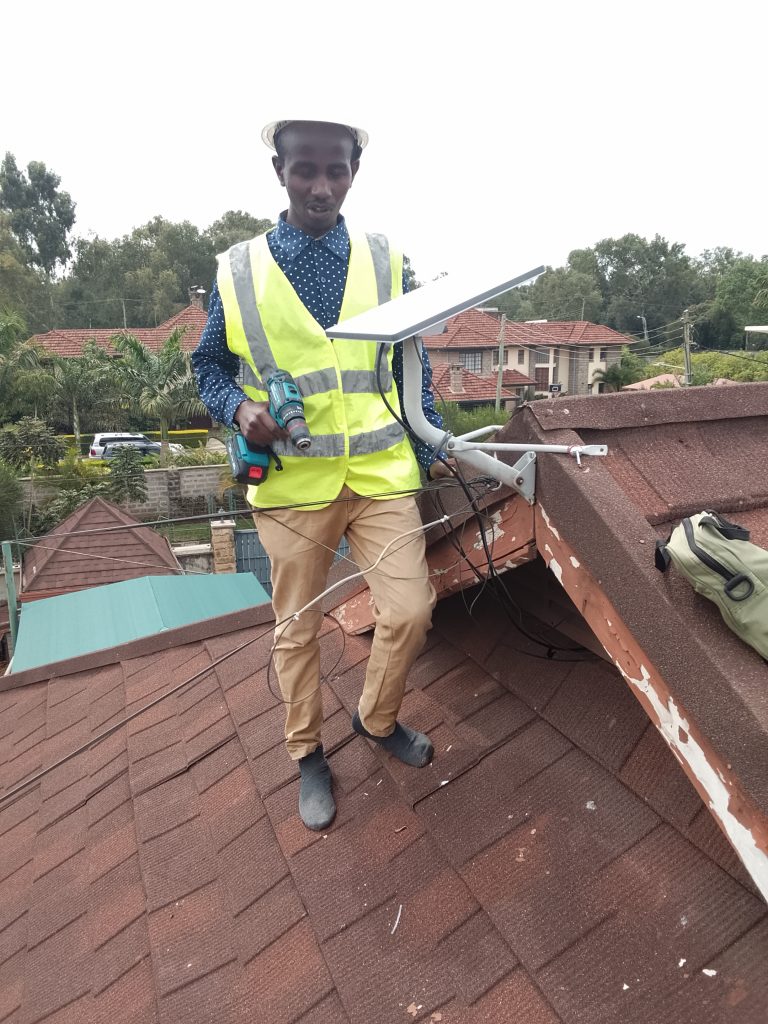
The Starlink Standard Actuated Kit is designed to be user-friendly, but installation quality still determines whether you get an average connection or an excellent one. Most performance complaints around satellite internet are not caused by the network — they are caused by poor placement, weak mounting, or improper cable routing.
Think of installation as laying the foundation of a building. If the foundation is strong, everything else works smoothly. If it’s rushed or poorly planned, problems appear later. Following best practices ensures long-term stability and fewer troubleshooting headaches.
5.1 Choosing the Right Location
The most important rule of Starlink installation is simple: the dish must see as much open sky as possible.
The dish needs a wide, unobstructed view of the sky to maintain a stable connection to moving satellites. Ideal locations include:
-
Rooftops
-
Elevated poles
-
Open yards
-
Clear balcony edges
Height is often your friend. The higher the dish is mounted, the fewer objects block its signal path.
In Kenya, many homes are surrounded by trees, water tanks, metal roofing, or neighboring buildings. Choosing a location that clears these obstacles dramatically improves stability.
A good location is not just about today — it should also consider future changes. Trees grow. New buildings appear. A placement that works now should remain clear over time.
5.2 Avoiding Signal Obstructions
Obstructions are the number one cause of performance issues.
Anything that blocks the sky — even partially — can interrupt satellite handoffs. This leads to:
-
Short dropouts
-
Speed fluctuations
-
Interrupted video calls
-
Buffering during streaming
Common obstructions include:
-
Trees and branches
-
Walls and rooftops
-
Water tanks
-
Metal structures
-
Nearby tall buildings
The Starlink app helps detect obstructions before installation. It shows whether the selected location has enough clear sky.
Even small obstructions matter. A dish that is 90% clear may still experience interruptions. The goal is to get as close to 100% sky visibility as possible.
5.3 Secure Mounting
A dish that moves is a dish that loses alignment.
Wind, vibration, or loose mounting can gradually shift the dish and affect signal quality. A secure mount ensures long-term stability.
Best mounting practices include:
-
Roof brackets anchored into solid structure
-
Pole mounts installed deep and stable
-
Wall mounts secured with proper hardware
-
Avoiding temporary or unstable surfaces
In Kenya’s windy regions and storm seasons, secure mounting is essential. A strong mount protects both performance and physical safety.
5.4 Cable Protection
The cable connecting the dish to the router carries both power and data. Damage to this cable can cause connection failure.
Proper cable routing means:
-
Avoiding sharp bends
-
Keeping cables away from foot traffic
-
Protecting from water entry points
-
Using clips or conduits for outdoor runs
-
Preventing exposure to extreme heat where possible
Water entering through cable holes is a common mistake. Sealing entry points prevents long-term structural damage and electrical risk.
Many professional installations include surge protection to protect against lightning or power spikes.
5.5 Router Placement
The router controls your indoor Wi-Fi experience. Even a perfect dish installation won’t help if the router is hidden behind thick walls or placed in a corner.
Best router placement:
-
Central location in the building
-
Elevated position
-
Away from thick concrete walls
-
Away from heavy metal structures
-
Clear of large electronics that cause interference
Large homes or offices may require:
-
Mesh Wi-Fi systems
-
Additional access points
-
Wired networking
The goal is even coverage, not just strong signal in one room.
5.6 DIY vs Professional Installation
The kit is designed so that basic installation is possible for many users. However, professional installation offers major advantages, especially in complex environments.
DIY installation works well when:
-
The location is simple
-
The sky view is clear
-
The building layout is small
-
The user is comfortable with tools
Professional installation is recommended when:
-
Mounting requires height or drilling
-
Cable routing is complex
-
The building is large
-
Business uptime is critical
-
Power backup integration is needed
Professionals optimize placement, ensure safety, and prevent long-term issues that may not be obvious during initial setup.
Installation quality is the single biggest factor that determines Starlink performance. Choosing the right location, eliminating obstructions, securing the mount, protecting cables, and placing the router correctly all work together to create a stable connection. While DIY installation is possible in simple cases, professional setup ensures optimal results and long-term reliability. A well-installed Starlink system performs better, lasts longer, and requires far less troubleshooting over time.
6. Real-World Use Cases in Kenya

One of the reasons the Starlink Standard Actuated Kit has spread so quickly is that it is not limited to one type of user. It adapts to very different environments — urban homes, rural schools, remote farms, and mobile project sites. In Kenya, where connectivity challenges vary widely by location and sector, this flexibility makes the system especially valuable.
Below are the most common real-world scenarios where the kit is making a measurable difference.
6.1 Homes and Families
For many Kenyan families, the biggest issue with internet is inconsistency. A connection that works well in the morning may slow down in the evening. Fiber outages interrupt work. Mobile data becomes congested at peak hours. Starlink offers a stable alternative that doesn’t depend on neighborhood infrastructure.
In homes, the kit supports:
-
Remote work and hybrid jobs
-
Online learning and virtual classrooms
-
Streaming and entertainment
-
Video calls with family abroad
-
Smart home devices and CCTV
-
Multiple users sharing one connection
Families living in areas with weak fiber or unstable mobile signals often experience the biggest improvement. Rural homes that previously relied on patchy 4G coverage can suddenly access full broadband capability.
For households with children in school or parents working remotely, that stability directly affects productivity and education.
6.2 Schools and Institutions
Schools and training institutions depend heavily on reliable internet for modern education. Digital classrooms, research platforms, online exams, and teacher resources all require stable connectivity.
In many rural parts of Kenya, schools struggle with slow or unreliable internet, limiting access to digital tools. Starlink allows institutions to bypass local infrastructure gaps and connect directly to satellites.
Typical school use cases include:
-
E-learning platforms
-
Teacher training programs
-
Research access
-
Administrative systems
-
Video learning sessions
-
Remote collaboration
For institutions located far from urban infrastructure, Starlink can effectively level the playing field, giving students access to the same digital resources available in major cities.
6.3 Businesses and Offices
Businesses cannot afford downtime. A single day without internet can disrupt payments, operations, communication, and customer service. Many Kenyan companies install Starlink as:
-
A primary business connection in remote areas
-
A backup line to protect against fiber cuts
-
A failover system for continuity planning
Common business uses include:
-
POS and digital payments
-
Cloud accounting systems
-
Customer communication
-
VoIP and video meetings
-
Inventory management
-
CCTV monitoring
Small and medium enterprises benefit especially because Starlink reduces dependency on fragile infrastructure. When fiber goes down, operations continue.
For offices operating in rural or industrial zones where fiber is unavailable, Starlink may be the only broadband option capable of supporting modern business workflows.
6.4 Farms and Remote Operations
Agricultural operations and remote project sites often suffer the worst connectivity limitations. Yet these environments increasingly rely on digital coordination.
Farms and remote facilities use Starlink for:
-
Monitoring systems and sensors
-
Security cameras
-
Logistics coordination
-
Staff communication
-
Remote equipment management
-
Data reporting
Because Starlink does not depend on nearby towers or cables, large properties and isolated operations can maintain reliable communication with central offices or supply chains.
In Kenya’s agricultural sector, connectivity is becoming part of productivity. Starlink enables modern farm management tools that were previously impractical in remote areas.
6.5 Temporary or Mobile Deployments
Some users don’t need permanent installations — they need fast, temporary internet. Construction sites, field research teams, disaster response operations, and event setups all require immediate connectivity.
Starlink’s portability makes it ideal for:
-
Construction sites
-
Road projects
-
Field surveys
-
Mining or exploration camps
-
Outdoor events
-
Emergency response deployments
Because the system can be set up quickly and moved when needed, it supports operations that traditional infrastructure cannot reach in time.
The Starlink Standard Actuated Kit proves its value through versatility. It works equally well in homes, schools, offices, farms, and mobile environments. In Kenya, where connectivity challenges differ dramatically between urban and rural areas, this adaptability is critical. Whether supporting a family’s daily needs, enabling digital education, protecting business continuity, powering remote operations, or connecting temporary sites, the kit functions as a universal connectivity tool across sectors.
7. Advantages of the Standard Actuated Kit

The Starlink Standard Actuated Kit stands out not just because it works, but because it solves many of the structural problems that affect internet access in Kenya. Its advantages go beyond speed — they touch reliability, accessibility, and flexibility. These strengths explain why users in very different sectors are adopting the system.
7.1 Independence from Local Infrastructure
One of the biggest advantages of Starlink is that it does not depend on local cables, nearby towers, or regional network quality. Fiber cuts, tower congestion, and infrastructure failures affect traditional internet providers because they rely on ground networks. Starlink bypasses that entire chain by connecting directly to satellites.
This independence means:
-
Fewer outages caused by cable damage
-
Less impact from neighborhood congestion
-
Stable service even in underserved regions
-
Connectivity in places where fiber will not reach soon
For Kenyan users who experience repeated service disruptions, this independence is often the main reason for switching.
7.2 Fast Deployment
Traditional broadband installations can take days or weeks, especially in areas where infrastructure is limited. Starlink can be deployed much faster because it does not require trenching, permits, or extended cabling projects.
Once the kit is available, installation typically involves mounting the dish, routing the cable, and powering the system. In many cases, users can be online the same day.
This speed is particularly valuable for:
-
New businesses opening locations
-
Remote project sites
-
Temporary operations
-
Schools or institutions needing urgent connectivity
Fast deployment reduces downtime and accelerates productivity.
7.3 Automatic Alignment
The actuated design removes one of the most common causes of poor satellite performance: human error during setup. The dish aligns itself automatically and continues optimizing over time.
Benefits include:
-
Reduced installation mistakes
-
Consistent signal quality
-
Less need for technical adjustments
-
Easier maintenance
For users without technical expertise, this automation makes the system accessible and dependable.
7.4 Nationwide Coverage
Because Starlink operates through satellites, its coverage is not tied to urban infrastructure. As long as there is power and open sky, the system can function.
This makes it suitable for:
-
Rural communities
-
Agricultural regions
-
Coastal and mountainous areas
-
Remote institutions
-
Locations beyond fiber expansion zones
Nationwide coverage helps close the digital gap between cities and remote areas.
7.5 Scalability
The Standard Actuated Kit can grow with user needs. While the base kit supports typical home and small business usage, it can be expanded with additional networking equipment.
Users can add:
-
Mesh Wi-Fi systems
-
Wired access points
-
Network switches
-
Business-grade routers
-
Power backup systems
This scalability allows the system to evolve from a simple home setup into a more complex office or institutional network without replacing the core hardware.
The Starlink Standard Actuated Kit offers a combination of independence, speed, automation, coverage, and scalability that traditional internet systems struggle to match. By removing reliance on fragile infrastructure and simplifying deployment, it gives users more control over their connectivity. For Kenyan homes, businesses, and remote operations, these advantages translate into reliability, flexibility, and long-term value.
8. Limitations to Consider

While the Starlink Standard Actuated Kit offers major advantages, no technology is perfect. Understanding its limitations helps users plan realistically and avoid disappointment. Most of these limitations are not deal-breakers — they are simply factors that must be managed through good installation and expectations.
8.1 Requires Electricity
Starlink is entirely dependent on power. If electricity goes out, the dish and router stop working, which means the internet connection stops as well.
In parts of Kenya where power outages occur, this becomes an important planning issue. Many users solve it by integrating:
-
UPS backup systems
-
Inverters
-
Solar + battery setups
-
Generators
Businesses that rely on continuous connectivity almost always pair Starlink with backup power. Without it, the best internet hardware cannot stay online during an outage.
The key takeaway: Starlink is reliable — but only as reliable as your power supply.
8.2 Needs Open Sky Visibility
The dish requires a wide, unobstructed view of the sky. Trees, tall buildings, walls, and metal structures can block signals and interrupt satellite handoffs.
Even partial obstruction can cause:
-
Short connection drops
-
Video call freezes
-
Speed fluctuations
-
Streaming interruptions
This is not a flaw — it is a physical reality of satellite communication. The system works best when mounted high with a clear sky path.
Urban apartments with limited rooftop access or heavily forested rural homes may require creative mounting solutions to achieve proper visibility.
8.3 Subscription Model
Owning the hardware is not enough — Starlink operates on a recurring service subscription. Users must maintain an active plan to stay connected.
For some households or small organizations, the ongoing cost must be weighed against local alternatives. However, many users view the subscription as a trade-off for:
-
Reliability
-
Independence from fiber outages
-
Coverage in remote areas
-
Business continuity
Understanding that this is a long-term service commitment helps users budget realistically.
8.4 Additional Wi-Fi Equipment for Large Spaces
The included router works well for small to medium homes, but large houses, offices, schools, or multi-building compounds often require expanded networking.
Users may need:
-
Mesh Wi-Fi systems
-
Extra access points
-
Wired Ethernet distribution
-
Business-grade routers
This is not unique to Starlink — it applies to any broadband service. The dish provides the internet connection, but indoor coverage depends on the internal network design.
The limitations of the Starlink Standard Actuated Kit are mostly planning considerations rather than technical failures. It requires stable electricity, clear sky visibility, a subscription commitment, and proper indoor networking for large spaces. Users who understand these factors upfront and plan accordingly experience far fewer problems and much higher satisfaction. In most cases, the benefits of reliable satellite connectivity outweigh these manageable constraints.
9. Who Should Buy the Kit?

The Starlink Standard Actuated Kit is not a niche product — it serves a wide range of users who share one common need: reliable internet that does not depend on fragile local infrastructure. While almost anyone can benefit from it, certain user groups gain especially strong value because of how the system is designed.
Understanding who the kit is best suited for helps set realistic expectations and highlights where it delivers the biggest impact.
9.1 Home Users
For households, the kit is ideal for families that depend heavily on internet for work, education, and daily communication. Homes that experience unstable fiber, slow mobile data, or total lack of coverage often see the biggest improvement.
Typical home benefits include:
-
Stable remote work and hybrid jobs
-
Smooth online learning for students
-
Reliable streaming and entertainment
-
Video calls with relatives abroad
-
Smart home and security systems
-
Shared usage across multiple devices
Families living in rural areas or fast-growing suburbs where infrastructure lags behind development often find Starlink to be the first truly dependable broadband option available to them.
9.2 Small and Medium Businesses
For businesses, internet downtime equals lost money. Payment systems fail, communication stops, and operations slow down. The Starlink kit is especially useful for small and medium enterprises that need dependable uptime.
Businesses use it as:
-
A primary internet connection in underserved areas
-
A backup line to protect against fiber cuts
-
A redundancy system for continuity planning
It supports cloud tools, digital payments, remote access, and office communication. For companies operating outside major cities or in industrial zones, it can be the difference between constant interruptions and stable operations.
9.3 NGOs and Remote Teams
Non-governmental organizations and field teams often operate in regions where infrastructure is weak or nonexistent. Starlink allows these groups to maintain communication, reporting, and coordination regardless of location.
Common NGO and remote team uses include:
-
Field data reporting
-
Emergency coordination
-
Remote training sessions
-
Communication with headquarters
-
Monitoring and logistics systems
For teams that move between locations or operate in challenging terrain, the portability and independence of the system are major advantages.
9.4 Institutions and Field Projects
Institutions such as schools, health facilities, research centers, and infrastructure projects increasingly rely on digital systems. In many remote Kenyan regions, these institutions struggle to obtain stable connectivity through traditional providers.
Starlink enables:
-
Digital education platforms
-
Medical record systems
-
Research data access
-
Coordination between remote sites
-
Temporary project connectivity
Because the kit can be installed quickly and relocated when necessary, it supports both permanent and temporary institutional deployments.
The ideal Starlink Standard Actuated Kit user is anyone who prioritizes reliability, coverage, and independence over dependence on local infrastructure. It is especially valuable for households in underserved areas, businesses that cannot afford downtime, NGOs operating in remote regions, and institutions that require stable connectivity outside major cities. In environments where traditional internet is unreliable or unavailable, this kit becomes less of a luxury and more of a critical infrastructure tool.
10. Frequently Asked Questions (FAQs)
When people consider installing the Starlink Standard Actuated Kit, the same practical questions tend to come up. Most concerns are about reliability, installation difficulty, and whether the system can truly replace traditional internet. Below are clear answers based on how the technology works in real-world conditions.
10.1 Does rain stop Starlink?
Heavy rain does not usually stop Starlink, but very intense storms can temporarily reduce signal strength. This effect is known as rain fade and affects all satellite communication systems to some degree.
During light and moderate rain, users typically notice little to no impact. In extremely heavy storms, speeds may drop briefly or short interruptions may occur. The system is designed to recover quickly once weather conditions improve.
Proper installation helps minimize weather impact. A clear sky view and secure mounting allow the dish to maintain the strongest possible connection even during challenging conditions.
10.2 Can I install it myself?
Yes, many users can install the kit themselves, especially in simple environments with easy rooftop access and clear sky visibility. The system is designed with guided setup through the Starlink app, which helps identify the best location and confirm connection status.
However, professional installation is recommended when:
-
Mounting requires height or complex drilling
-
Cable routing is long or difficult
-
The building is large
-
Business uptime is critical
-
Power backup integration is needed
Professional installers optimize placement and reduce the risk of mistakes that could affect performance long term.
10.3 Can it replace fiber?
In many situations, yes — especially where fiber is unreliable or unavailable. For users experiencing frequent outages or unstable speeds, Starlink can function as a primary connection.
That said, some businesses choose a hybrid approach: fiber as the main line and Starlink as a backup. This creates redundancy and protects operations during outages.
The best choice depends on location, infrastructure quality, and how critical uptime is for the user.
10.4 Is it suitable for offices?
Yes. The Standard Actuated Kit can support office environments, especially small and medium businesses. It handles cloud systems, payments, communication, and video conferencing effectively.
Larger offices may require additional internal networking such as:
-
Mesh Wi-Fi systems
-
Wired access points
-
Network switches
-
Business routers
The dish provides the internet connection, but internal networking determines how well that connection is distributed across the office.
10.5 How long does setup take?
Basic installation can be completed in under an hour in simple environments. More complex installations — such as rooftop mounting, long cable runs, or power backup integration — may take longer.
Most of the time spent during setup is not technical configuration but physical installation: choosing the right location, securing the mount, and routing cables safely.
Most concerns about Starlink come from outdated assumptions about satellite internet. The Standard Actuated Kit is designed to be stable, user-friendly, and suitable for real productivity. It continues working in rain, supports self-installation in simple setups, can replace unreliable fiber, works well in offices, and installs relatively quickly. With proper planning and placement, users experience a modern broadband connection rather than the fragile satellite systems of the past.
Upgrade to Kenya’s Most Reliable Satellite Internet with Spacelink Kenya

The Starlink Standard Actuated Kit represents a major leap forward in how internet can be delivered across Kenya. It combines automated satellite alignment, modern broadband performance, and plug-and-play hardware into a system that ordinary homes and businesses can deploy with confidence. Instead of depending on fragile ground infrastructure, users gain a direct link to a global satellite network that maintains stability even where fiber and mobile networks struggle. From families running remote work and online classes to businesses protecting daily operations, the kit offers a dependable foundation for modern digital life.
What makes this technology a true game changer for Kenya is its ability to close the connectivity gap between urban centers and remote regions. Areas that once had weak or unreliable service can suddenly access consistent broadband speeds. Schools gain digital learning tools, organizations maintain real-time communication, and businesses reduce costly downtime. The actuated design removes installation guesswork and keeps the system optimized automatically, delivering a connection that feels modern rather than experimental. In a country where reliable internet increasingly determines opportunity, this level of independence is transformative.
To unlock the full potential of the system, installation quality is just as important as the hardware itself. Proper mounting, clear sky placement, safe cable routing, and smart network planning determine whether the connection performs well or exceptionally well. That’s why professional deployment matters. For expert setup, optimization, and long-term support, work with Spacelink Kenya specialists who understand Kenyan environments and ensure your Starlink system is built for maximum reliability. Partnering with professionals turns a great technology into a long-term connectivity solution you can trust.
Table of Contents
