Starlink Kenya Accredited Installers in Nairobi: Unlock Lightning-Fast, Reliable Internet
Nairobi’s internet needs have changed fast. More homes now rely on streaming, remote work, online learning, CCTV monitoring, and cloud-based systems, while businesses depend on stable connectivity for payments, communication, and operations. As a result, Starlink has become a serious option for people who want dependable internet without being limited by fiber rollouts, neighborhood congestion, or frequent last-mile faults. With this surge in demand, one truth has become clear: the quality of a Starlink experience in Nairobi is not only about buying the kit—it is heavily influenced by how professionally it is installed and configured.
Professional installation is essential because Starlink is not a plug-and-play Wi-Fi solution in the way many people assume. The dish must be mounted with the correct angle, height, and stability, and it must be placed where it has the clearest possible view of the sky. A small mistake—like mounting it too low, facing it toward nearby obstructions, or using weak brackets—can lead to intermittent disconnections, poor speeds at peak hours, or signal drops during weather changes. Beyond the dish itself, the internal network matters just as much. Poor cable routing, bad connector handling, or wrong placement of routers and access points can create dead zones indoors, making Starlink feel “slow” even when the satellite link is performing well.
DIY installation and unqualified installers introduce risks that many users only discover after problems start. A common issue is unsafe mounting, where installers drill into rooftops without proper sealing or use incorrect fasteners that cause leaks later. Another frequent problem is exposed cable runs that get damaged by sun, rain, or birds—leading to unexpected downtime. In apartments, inexperienced setups often fail because they don’t account for building height, balcony limitations, interference, or shared access constraints, resulting in a dish that constantly fights obstructions. Even when the connection works on day one, weak workmanship can lead to failures weeks later, and the user is left without support, troubleshooting knowledge, or reliable repair options.
That’s where accredited installers become important. Accreditation in installation generally signals that the technicians follow structured best practices, use proper tools and mounting systems, prioritize safety, and understand both the satellite equipment and the networking side of the setup. In practical terms, it means your installation is handled with a process—site assessment, obstruction checks, secure mounting, protected cabling, correct power setup, and full testing—rather than guesswork. Reliability improves because the dish is placed correctly from the beginning, and safety improves because the physical installation is done in a way that protects your roof, your walls, and the equipment itself.
In a city like Nairobi—where building types vary from high-rise apartments and townhouses to warehouses and office blocks—accreditation matters even more. Each environment needs a different approach: some locations require elevated mounting to avoid trees and nearby buildings; others need stronger brackets because of wind exposure on rooftops; and many businesses require professional network design to distribute Starlink bandwidth across multiple rooms, floors, or departments. An accredited installer is not just someone who “mounts the dish”—they help ensure the connection performs consistently, the network is stable indoors, and the setup remains safe and durable long after installation day.
Starlink is becoming a major connectivity option in Nairobi, but the real performance and long-term reliability depend heavily on proper installation and network configuration. DIY setups and unqualified installers can lead to poor signal, unsafe mounting, equipment damage, and costly repairs later. Choosing accredited installers is the smarter path because it brings structured best practices, safer workmanship, better performance, and dependable support. If you want Starlink that works consistently—without leaks, dropouts, or indoor dead zones—professional accredited installation is the key to getting the full value from your Starlink investment.
1. What Accreditation Means in Starlink Installation
Accreditation in Starlink installation means the work is done by technicians who follow proven, professional standards—not trial-and-error. In Nairobi, many people can claim they “install Starlink,” but accreditation separates trained professionals from casual installers by focusing on correct mounting methods, clean cabling, proper network configuration, safety compliance, and consistent performance testing. In simple terms, accreditation is a signal that your Starlink setup will be installed using best practices that protect your building, protect the equipment, and deliver stable speeds over the long term.
Instead of just mounting the dish and leaving, an accredited approach includes a structured installation process: site assessment to find the best sky view, obstruction checks to prevent dropouts, strong mounting hardware suitable for wind exposure, weatherproof cable routing, and correct indoor network configuration. This process matters because Starlink performance is highly dependent on the dish having a clear line of sight and a stable, secure mount. Even small mistakes—like placing the dish where trees partially block the sky or using weak brackets—can cause intermittent disconnections and slowdowns, especially during peak usage hours or poor weather.
1.1 Industry Standards and Certification
Industry standards refer to the professional methods used to install satellite and networking equipment safely and correctly. These standards cover how mounting should be done on different surfaces (iron sheets, concrete, tiles, parapets), how cables should be protected from sun and rain, how grounding and surge protection should be handled, and how indoor networking should be optimized. Certification reinforces that the installer understands and applies these standards consistently.
In Nairobi, where buildings vary widely—from apartments and maisonettes to warehouses and high-rise offices—standards are critical because the same installation method cannot be used everywhere. A professional installer must know when a roof mount is necessary, when a wall mount is safer, how to avoid leaks, and how to minimize vibration and wind movement that can weaken the mount over time. Accreditation ensures the installer treats your location as a technical environment, not a “one-size-fits-all” job.
1.2 Training and Technical Expertise
Training and expertise are at the core of accreditation. A trained installer understands both parts of the Starlink experience: the outdoor satellite terminal and the indoor network. That means they know how to position the dish for the strongest possible link, but also how to ensure the Wi-Fi works properly across your home or office.
Technical expertise includes:
Identifying the best installation point using obstruction checks (trees, nearby buildings, rooftop structures)
Ensuring stable mounting that can withstand wind and heavy rain
Routing cables neatly and safely to avoid water ingress and cable damage
Configuring the router correctly for the environment (home, office, multi-room, multi-floor)
Designing indoor coverage using access points or mesh when needed
Testing performance properly before handing over the system
This matters because many “speed complaints” are actually indoor network problems—not Starlink itself. Accreditation ensures the installer doesn’t stop at “internet is on,” but also ensures it is usable everywhere it’s needed.
1.3 Compliance with Safety and Mounting Regulations
Compliance means the installer follows safe working practices and correct mounting rules so your Starlink installation doesn’t become a hazard. This includes basic technician safety (proper ladder use, roof safety, correct tools) and structural safety for the building (proper drilling, correct anchoring, waterproof sealing, and avoiding weak mounting points).
A safe Starlink mount should:
Be firmly anchored to handle wind load and vibration
Use correct brackets and fasteners for the surface type
Be positioned to avoid falling risks or easy tampering
Include weatherproofing to prevent leaks and corrosion
Protect cables with conduit or trunking where appropriate
Avoid unsafe routing near sharp edges, hot surfaces, or high foot traffic areas
In Nairobi, this is especially important for apartments and businesses where poor mounting can risk injury, property damage, and repeated downtime. Accreditation reduces the chance of shortcuts that may look fine on day one but fail after a few weeks of sun, wind, and rain.
1.4 Quality Assurance and Warranty Protection
Quality assurance means the installer has a clear checklist to confirm everything works correctly before leaving. This typically includes testing signal stability, checking that the dish is firmly mounted, confirming the router is configured properly, and ensuring Wi-Fi coverage matches the customer’s needs. In a business setup, quality assurance may also include checking network segmentation, device priorities, failover configurations, and security settings.
Warranty protection is often tied to installation quality. Even when hardware warranties exist, damage caused by poor installation—like cable cuts, water ingress, corrosion from exposed connectors, or power surge damage from lack of protection—may not be covered. Accredited installers reduce the chances of installation-related failures and help ensure that any genuine equipment faults can be handled properly without confusion or blame-shifting.
In practical terms, quality assurance and warranty protection save you money and stress because:
You avoid repeat visits to “fix slow internet”
You reduce the risk of leaks, cable damage, and unstable mounts
You get a clean handover with basic user guidance
You have accountability if performance issues arise
Accreditation in Starlink installation is not just a label—it is a commitment to professional standards, trained workmanship, safety compliance, and verified performance. It means your Starlink dish is mounted securely, positioned correctly for the best sky visibility, and supported by a properly configured indoor network. Most importantly, it reduces the risks of shortcuts that cause dropouts, slow speeds, roof leaks, cable damage, and costly repairs later. If you want Starlink that performs consistently in Nairobi and stays reliable in the long term, choosing accredited installation is the smartest foundation for your connectivity.
2. Why Professional Starlink Installation Is Critical
Professional Starlink installation is not just about convenience—it directly affects signal quality, long-term reliability, and the safety of your property. Many people assume Starlink will perform perfectly as long as the equipment is powered on, but in reality, satellite internet is highly sensitive to placement, mounting strength, and network design. A professionally installed system is engineered for performance from day one, reducing dropouts, minimizing interference, and ensuring the connection remains stable even during heavy usage and harsh weather.
In Nairobi’s mixed urban environment—where trees, neighboring buildings, rooftop tanks, and metal structures can interfere with signal—precision installation becomes even more important. A trained installer understands how to evaluate the environment, anticipate future obstructions, and design a setup that continues to perform months and years later. Professional installation turns Starlink from a temporary solution into a dependable infrastructure asset for your home or business.
2.1 Proper Dish Positioning for Maximum Signal
Starlink performance depends heavily on clear sky visibility. The dish constantly tracks satellites, and even partial obstruction from trees, nearby buildings, or rooftop structures can interrupt the signal. A professional installer performs a site survey to identify the optimal mounting location, ensuring the dish has the widest unobstructed view possible.
Correct positioning is not just about height—it’s about angle, direction, and long-term environmental factors. For example, a dish placed too low may work today but fail later when trees grow or construction happens nearby. Accredited installers anticipate these risks and mount the dish in a way that protects future performance. This prevents frustrating issues like random disconnects, slow speeds at peak times, and inconsistent service that users often blame on the network instead of poor placement.
2.2 Avoiding Roof and Structural Damage
Improper installation can cause serious structural problems. Drilling without proper sealing leads to roof leaks, corrosion, and long-term water damage. Weak mounting hardware can loosen over time, especially during Nairobi’s heavy winds and rainstorms, creating safety hazards and expensive repairs.
Professional installers use the correct brackets, anchors, and waterproof sealing techniques suited to the roof material—whether iron sheets, concrete, tiles, or parapets. They distribute weight correctly, avoid structural weak points, and ensure the mount can withstand vibration and weather stress. A properly installed Starlink dish should be secure, stable, and invisible in terms of structural impact—no leaks, no cracks, no movement, and no risk to occupants below.
2.3 Clean Cable Routing and Weatherproofing
Cable management is one of the most overlooked parts of Starlink installation, yet it directly affects durability. Exposed cables degrade under sun exposure, absorb moisture, and can be damaged by animals or accidental pulling. Poor routing also creates tripping hazards and an unprofessional appearance.
Professional installers route cables neatly using conduit or protective trunking, seal entry points against water, and position cables away from heat, sharp edges, and high-traffic areas. Weatherproofing ensures connectors stay dry and corrosion-free, preserving signal integrity. Clean routing not only extends the lifespan of the equipment but also protects your property and maintains a tidy, professional finish.
2.4 Network Optimization for Homes and Offices
Even with perfect satellite signal, poor indoor network design can make Starlink feel slow. Many performance complaints come from Wi-Fi dead zones, interference, or overloaded routers—not the satellite connection itself. Professional installers optimize the internal network to match the space and usage needs.
In homes, this may involve mesh systems or access point placement to eliminate dead zones. In offices, it can include bandwidth management, device prioritization, and structured network layouts for multiple floors. A professionally optimized network ensures consistent speeds, stable video calls, reliable streaming, and smooth operation of business systems. It transforms Starlink from a simple internet link into a well-designed connectivity environment.
Professional Starlink installation is critical because it protects signal quality, property safety, and long-term performance. Proper dish positioning prevents dropouts, safe mounting avoids structural damage, clean cable routing extends equipment life, and network optimization ensures the connection is usable everywhere it’s needed. Skipping professional installation often leads to hidden problems that surface later as leaks, instability, or frustrating slowdowns. Investing in expert installation ensures Starlink delivers the fast, stable internet experience it is designed to provide—reliably and safely for years to come.
3. Common Problems with Unqualified Installers
Choosing an unqualified installer may seem cheaper or faster in the beginning, but it often creates hidden problems that surface weeks or months later. Starlink is precision equipment that depends on correct placement, secure mounting, and proper network configuration. When installation is rushed or done without professional standards, the result is unstable performance, safety risks, and ongoing frustration. Many users who blame Starlink itself are actually experiencing the consequences of poor installation.
In Nairobi’s dense urban landscape, installation mistakes are amplified. Nearby buildings, trees, rooftop clutter, and weather exposure all demand careful planning. An unqualified installer may simply mount the dish in the easiest spot rather than the best spot, ignore structural safety, or skip proper cable protection. These shortcuts can turn a premium internet system into a constant source of troubleshooting and repair.
3.1 Weak or Unstable Signal
One of the most common issues is weak or inconsistent signal. This usually happens when the dish is placed without a proper obstruction check. Even partial blockage from trees, water tanks, or neighboring structures can interrupt the satellite link. The connection may appear fine during installation but later suffer random dropouts, buffering, and speed fluctuations.
Unqualified installers often focus on convenience instead of performance. They may mount the dish too low, too close to obstructions, or in a temporary position that cannot maintain stable sky visibility. The user then experiences unpredictable internet behavior—especially during peak hours or weather changes—without understanding the root cause. Correct placement requires assessment tools and experience, not guesswork.
3.2 Unsafe Mounting Practices
Improper mounting is a serious safety concern. Weak brackets, incorrect anchors, or careless drilling can damage roofs and walls. Over time, vibration and wind can loosen a poorly secured mount, increasing the risk of the dish falling or shifting position. Roof leaks are another common consequence when sealing is ignored or done incorrectly.
Unsafe mounting not only threatens property but also endangers people below. A falling or unstable dish becomes a hazard in apartments, offices, or public spaces. Professional mounting should be engineered to withstand weather stress and structural movement. When shortcuts are taken, the installation becomes a long-term liability rather than a reliable asset.
3.3 Exposed Cables and Water Damage
Cable protection is often neglected by inexperienced installers. Exposed cables degrade quickly under sunlight, collect moisture, and are vulnerable to physical damage. Water entering through poorly sealed cable entry points can damage both the equipment and the building structure.
Over time, this leads to corrosion, signal interruptions, and expensive replacements. In severe cases, water intrusion can cause interior damage or electrical risks. Proper installation includes conduit protection, sealed entry points, and routing that keeps cables safe from heat, sharp edges, and foot traffic. Skipping these steps drastically shortens the lifespan of the system.
3.4 Poor Indoor Network Performance
Many users assume slow internet is caused by the satellite link when the real issue is indoor Wi-Fi design. Unqualified installers often stop after mounting the dish and plugging in the router, without considering coverage, interference, or device load.
The result is dead zones, unstable video calls, and inconsistent speeds across rooms or floors. Homes and offices with thick walls or large layouts require thoughtful access point placement or mesh systems. Without network optimization, even a strong Starlink signal feels unreliable. Proper installation should ensure the internet is usable everywhere—not just near the router.
3.5 Lack of After-Installation Support
One of the biggest problems with unqualified installers is disappearing support. When issues arise, users often find there is no accountability, no warranty guidance, and no reliable troubleshooting assistance. The installer may be unreachable or unwilling to fix mistakes.
Professional installers provide structured support, performance checks, and accountability. Without that support, customers are left guessing whether problems are caused by equipment, environment, or installation errors. This uncertainty leads to wasted time, extra costs, and repeated service interruptions.
Unqualified Starlink installation creates a chain of problems: unstable signal, unsafe mounting, exposed cables, poor indoor coverage, and zero support when things go wrong. These issues may not appear immediately, but they surface over time as frustration, repair costs, and performance complaints. Choosing a professional installer prevents these risks by ensuring proper placement, safe mounting, protected cabling, and optimized networking from the start. A well-installed Starlink system should feel invisible in operation—stable, safe, and dependable—and that reliability begins with qualified installation.
4. What Spacelink Kenya Provides as an Accredited Installer
Working with an accredited installer means you’re not just paying for equipment setup—you’re investing in a complete connectivity solution designed for reliability, safety, and performance. A professional installation provider approaches Starlink as infrastructure, not a quick job. Every step is planned to ensure the system performs consistently in real-world conditions, especially in a city like Nairobi where buildings, weather, and interference vary widely.
An accredited installer focuses on long-term results. That means evaluating your environment before installation, using professional mounting hardware, optimizing indoor networking, and ensuring the system is tested thoroughly before handover. Instead of reacting to problems after they happen, the goal is to prevent them entirely through structured installation and technical best practices.
4.1 Site Survey and Signal Assessment
A proper installation begins with a site survey. This is a technical assessment of your property to determine the best possible dish location. The installer checks for obstructions such as trees, nearby buildings, rooftop equipment, and future construction risks that could interfere with satellite tracking.
Signal assessment ensures the dish has maximum sky visibility for stable performance. This step prevents random disconnections, slow speeds, and peak-hour instability. It also helps plan cable routing and mounting strategy in advance, reducing surprises during installation. A professional survey turns installation into a calculated decision rather than a guess.
4.2 Professional Mounting Solutions
Mounting is engineered, not improvised. Professional installers use strong, weather-resistant brackets and anchors matched to the building structure—whether concrete, metal roofing, tiles, or parapets. The goal is a mount that remains stable through wind, rain, vibration, and long-term exposure.
Proper mounting prevents leaks, structural damage, and safety risks. The dish is positioned to minimize movement while maximizing signal quality. A well-mounted Starlink dish should feel permanent and secure, not temporary or fragile. This protects both the equipment and the building itself.
4.3 Business-Grade Networking Setup
Starlink performance doesn’t stop at the dish. Indoor networking determines how usable the internet feels. Accredited installers design the internal network based on the size and purpose of the space.
For homes, this may include mesh Wi-Fi to eliminate dead zones. For offices, it involves structured network layouts, bandwidth management, and access point placement for multiple users and devices. Business-grade setup ensures stable video calls, smooth cloud operations, and consistent speeds across rooms and floors. The connection is engineered for real usage, not just basic connectivity.
4.4 Secure Cable Management
Cable management protects the system from environmental damage and maintains a clean installation appearance. Professional installers route cables using protective conduit or trunking, seal wall and roof entry points, and position cables away from heat, sharp edges, and foot traffic.
This prevents water intrusion, corrosion, accidental damage, and signal degradation. Clean cable routing also extends equipment lifespan and reduces maintenance costs. A professionally installed system looks organized, safe, and durable rather than messy or exposed.
4.5 Testing and Performance Optimization
Before the installation is considered complete, the system undergoes testing. Installers verify signal stability, confirm dish alignment, check indoor network coverage, and run performance tests. Optimization ensures the router settings, device load handling, and coverage layout match the environment.
This step eliminates guesswork. Customers receive a system that is verified to work correctly under normal usage conditions. Performance testing ensures the internet is not only connected, but fast, stable, and consistent throughout the property.
4.6 Ongoing Technical Support
Installation is only the beginning. Accredited installers provide ongoing technical support to help customers manage future needs. This includes troubleshooting assistance, upgrade guidance, maintenance advice, and accountability if issues arise.
Reliable support means customers are not left alone after installation. Whether expanding coverage, adjusting equipment, or diagnosing performance changes, professional backing ensures the system continues operating at its best.
An accredited installer provides far more than a basic setup—they deliver a complete, engineered connectivity solution. From site survey and mounting to network optimization and ongoing support, every step is designed to protect performance, safety, and long-term reliability. Choosing professional installation ensures your Starlink system operates at full potential without hidden risks or recurring problems. A properly installed network should work quietly in the background, delivering stable internet every day—and that level of reliability starts with expert installation.
5. Starlink Installation for Homes in Nairobi
Home Starlink installations in Nairobi are not one-size-fits-all. The city has a wide mix of housing styles—apartments, maisonettes, townhouses, and gated estates—each with different mounting challenges and network needs. A professional installation adapts to the building type, surrounding environment, and household usage patterns. The goal is the same in every case: stable satellite signal outside and strong Wi-Fi coverage inside.
Residential users often expect Starlink to simply replace fiber or mobile internet, but satellite connectivity introduces unique placement and design requirements. Trees, neighboring buildings, balconies, rooftop tanks, and estate regulations all influence how and where the dish can be installed. A well-planned home installation ensures reliable performance without damaging the building or violating property rules.
5.1 Apartment Installations
Apartments present the biggest installation challenges because residents rarely control rooftop access. Balconies, shared rooftops, and building management policies all affect dish placement. A professional installer evaluates whether the balcony has sufficient sky visibility or if a rooftop mount is required.
Improper apartment installations often fail due to obstructions from nearby buildings. The dish may connect initially but suffer frequent dropouts later. Accredited installers perform obstruction checks before mounting and coordinate with building management when necessary. Cable routing is also carefully planned to avoid damaging walls or creating unsafe pathways inside shared spaces.
Apartment networking requires special attention because Wi-Fi interference from neighboring units is common. Professional installers optimize router placement and may recommend mesh systems to ensure stable coverage inside the apartment without signal congestion.
5.2 Standalone Houses
Standalone homes offer more flexibility but still require technical planning. The installer must select a mounting point that provides maximum sky visibility while maintaining structural safety. Roof type, height, and surrounding trees are evaluated before installation begins.
Poor placement on houses often results in avoidable signal interruptions. For example, mounting too close to tall trees or decorative rooftop structures can create partial obstructions. Professional installers anticipate growth, seasonal foliage, and environmental changes that could affect performance later.
Indoor coverage in larger homes is another key factor. Thick walls and multi-room layouts can weaken Wi-Fi signals. A professional setup ensures consistent internet across bedrooms, living areas, and home offices using optimized router placement or additional access points.
5.3 Gated Communities
Gated communities add another layer of complexity because estate guidelines may restrict visible equipment or rooftop modifications. Installers must balance performance with compliance, ensuring the dish is mounted securely while respecting estate rules.
In dense gated neighborhoods, nearby homes can create signal obstacles. A site survey becomes critical to identify the best elevation and angle for uninterrupted connectivity. Professional installers also ensure cables are hidden neatly to preserve the property’s appearance.
Community environments often benefit from stronger internal networking design. Families may run multiple devices simultaneously—streaming, gaming, remote work, and smart home systems—requiring stable bandwidth distribution across the household.
5.4 Rooftop Mounting Considerations
Rooftop mounting is often the best solution for clear sky visibility, but it must be engineered carefully. Nairobi’s weather includes strong winds, heavy rain, and intense sun exposure. A weak rooftop mount will fail over time.
Professional rooftop installation includes:
Strong, weather-resistant mounting brackets
Waterproof sealing to prevent leaks
Proper anchoring to structural support points
Vibration-resistant positioning
Safe cable routing away from water pooling areas
The installer must also consider future maintenance access. A dish that is impossible to reach safely becomes a long-term problem. Good rooftop design balances accessibility, safety, and signal performance.
Home Starlink installation in Nairobi requires more than simply attaching a dish—it demands a customized approach based on housing type, environment, and family internet needs. Apartments, standalone houses, and gated communities all present unique technical challenges that must be solved professionally. Proper mounting, obstruction planning, and indoor network optimization ensure the connection remains stable and usable throughout the home. When installation is handled correctly, Starlink becomes a dependable household utility rather than a constant troubleshooting project, delivering fast and reliable internet every day.
6. Starlink Installation for Businesses in Nairobi
Business Starlink installations in Nairobi require a higher level of planning than residential setups because connectivity directly affects revenue, productivity, and customer experience. Offices rely on stable internet for payments, cloud systems, communication platforms, CCTV monitoring, and remote collaboration. A poorly installed system can interrupt operations, delay transactions, and damage business credibility. Professional installation ensures Starlink functions as business infrastructure—not just a backup connection.
Commercial environments also introduce technical complexity. Office buildings often have dense device usage, multiple departments, thick concrete walls, and several floors. Without proper network design, even a strong satellite link can feel slow or unreliable indoors. Business installation focuses on performance consistency, redundancy, and scalability so the network continues supporting growth.
6.1 Office Connectivity Solutions
Office installations are designed around how the business operates. A small office with a few staff members has very different needs from a busy workspace handling dozens of devices. Professional installers evaluate bandwidth usage, device density, and critical systems before configuring the network.
Proper office connectivity includes router placement that minimizes congestion, traffic prioritization for important applications, and secure internal networking. This ensures video meetings remain stable, payment systems function smoothly, and cloud tools operate without lag. The installation is engineered for workflow efficiency, not just internet access.
6.2 Failover Internet Backup Systems
Many Nairobi businesses use Starlink as a failover solution to protect against fiber outages. Internet downtime can halt payments, disrupt communication, and stop operations entirely. A professional failover setup automatically switches to Starlink the moment the primary connection fails, keeping the business online without manual intervention.
Unqualified setups often rely on manual switching, which wastes time and increases downtime. A properly configured failover system integrates both connections into a smart routing environment. Employees and customers may not even notice an outage because the transition happens instantly. This level of redundancy protects revenue and maintains operational continuity.
6.3 Multi-Floor Network Design
Businesses operating across multiple floors require structured network planning. Wi-Fi signals weaken through concrete and steel, creating dead zones that interrupt productivity. Professional installers design vertical network distribution using access points, switches, and structured cabling to maintain consistent coverage.
Instead of relying on a single router, the network is segmented intelligently across floors. This prevents overcrowding on one device and ensures stable speeds for every department. A multi-floor design allows the network to scale as the business expands without needing a complete rebuild.
6.4 Enterprise Wi-Fi Coverage
Enterprise environments demand stronger, more reliable Wi-Fi than home setups. High device density, guest networks, security requirements, and bandwidth management all need careful configuration. Professional installation includes enterprise-grade access points positioned for maximum coverage and minimal interference.
Enterprise Wi-Fi design also includes network security, device prioritization, and monitoring capabilities. Sensitive business data is protected, and critical applications receive stable bandwidth. Employees experience consistent connectivity across meeting rooms, workstations, and shared spaces. The network becomes a controlled environment rather than a chaotic signal spread.
Business Starlink installation in Nairobi is about protecting operations, not just providing internet access. Professional setup ensures office connectivity is stable, failover systems prevent downtime, multi-floor networks eliminate dead zones, and enterprise Wi-Fi supports heavy device usage securely. When installed correctly, Starlink becomes a strategic asset that keeps businesses running smoothly even during outages or peak demand. A well-engineered network allows companies to focus on growth and service delivery instead of troubleshooting connectivity problems.
7. Areas in Nairobi Covered by Professional Installers
Professional Starlink installation services in Nairobi are designed to support the city’s diverse geography—from dense commercial districts to fast-growing outskirts. Each area presents different technical challenges, including building height, signal obstruction, infrastructure limitations, and environmental exposure. Accredited installers adapt their approach depending on the location to ensure consistent performance regardless of setting.
Coverage is not just about reaching an area—it’s about understanding how the environment affects satellite connectivity. High-rise zones require elevation strategy, industrial zones demand durability, and suburban growth areas often require creative mounting solutions. Professional installers plan installations with location-specific factors in mind so customers receive stable internet wherever they are.
7.1 CBD and Commercial Zones
The Nairobi CBD and major commercial hubs are filled with high-rise buildings, metal structures, rooftop equipment, and signal reflections. These environments require careful dish positioning to avoid obstruction and interference. A professional installer performs detailed rooftop assessments to secure a clear sky view above surrounding structures.
Commercial zones also demand strict cable routing and aesthetic considerations. Installations must remain clean and discreet while complying with building regulations. Businesses in the CBD depend on uptime, so installers prioritize mounting stability and failover readiness. The result is reliable connectivity in one of the most technically challenging parts of the city.
7.2 Residential Estates
Residential estates vary from gated communities to apartment clusters and suburban neighborhoods. Each estate has its own rules regarding visible equipment and building modification. Professional installers work within these constraints while ensuring optimal dish placement.
In residential zones, obstructions like trees, neighboring roofs, and decorative structures are common. Installers perform obstruction analysis before mounting and design cable routing that protects the property’s appearance. Indoor network optimization is equally important to support family usage, remote work, and smart home devices. The goal is performance without compromising the home environment.
7.3 Industrial Areas
Industrial zones require heavy-duty installation practices. Warehouses and factories often have large metal roofs, vibration from machinery, and exposure to dust and extreme weather. Installers use reinforced mounting hardware and industrial-grade cable protection to ensure durability.
These environments may also require extended cable runs and specialized networking setups to cover large floor areas. Professional installers design networks capable of supporting CCTV systems, logistics platforms, and operational equipment without interference. Reliability in industrial settings is critical because downtime can disrupt production and supply chains.
7.4 Outskirts and Expanding Neighborhoods
Nairobi’s expanding outskirts often lack stable fiber infrastructure, making Starlink a primary connectivity option. These areas may include new housing developments, farms, schools, and remote offices. Installation in such locations requires flexibility because terrain, access, and infrastructure vary widely.
Professional installers adapt mounting strategies to open land, uneven structures, and future construction growth. Elevated mounts are often necessary to maintain long-term sky visibility. In developing neighborhoods, installers also design scalable internal networks so customers can expand coverage as properties grow.
Professional Starlink installers serve every part of Nairobi by adapting their approach to each environment—high-rise commercial zones, residential estates, industrial facilities, and rapidly expanding outskirts. Location-specific planning ensures stable signal, safe mounting, and durable performance regardless of setting. Reliable connectivity is achievable anywhere in the city when installation is engineered around the environment. A professionally installed Starlink system delivers consistent internet whether in the CBD, a gated estate, a factory, or a new suburban development, allowing users to stay connected without compromise.
8. Installation Process Step-by-Step
A professional Starlink installation follows a structured process designed to eliminate guesswork and ensure consistent performance. Each step builds on the previous one, turning the installation into a planned technical project rather than a quick hardware setup. This methodical approach protects signal quality, building safety, and long-term reliability. Customers benefit from a predictable workflow where nothing is rushed and every detail is checked before handover.
A step-by-step process is especially important in Nairobi’s mixed environments, where building types, weather exposure, and network demands vary widely. Professional installers follow a repeatable system that ensures every installation meets the same quality standard regardless of location.
8.1 Initial Consultation
The process begins with understanding the customer’s needs. During consultation, installers gather information about the property type, internet usage, number of devices, and coverage expectations. A home user streaming and working remotely has different requirements from a multi-floor office running cloud systems.
This stage sets clear expectations and allows the installer to plan equipment, mounting strategy, and network design in advance. Proper consultation prevents misunderstandings and ensures the final installation matches real-world usage, not assumptions.
8.2 Site Inspection
A physical site inspection confirms technical details before installation begins. Installers evaluate rooftop access, obstruction risks, structural strength, cable entry points, and indoor router placement. Trees, neighboring buildings, and rooftop structures are assessed for potential signal interference.
Inspection transforms planning into measurable decisions. It identifies the safest and most effective mounting location while avoiding future performance issues. This step prevents rushed decisions on installation day and ensures the environment supports a stable Starlink connection.
8.3 Equipment Setup
Before mounting, the equipment is prepared and verified. Installers check the Starlink kit, cables, brackets, and networking components to confirm everything is complete and functional. Pre-setup ensures there are no surprises once installation begins.
This step includes staging the router, confirming power access, and organizing tools and materials. Proper preparation reduces installation time and ensures a smooth workflow without interruptions.
8.4 Mounting and Cable Routing
Mounting is executed with structural safety and signal performance in mind. The dish is installed using strong brackets and weather-resistant anchors suited to the building surface. Waterproof sealing is applied to prevent leaks and corrosion.
Cable routing is performed neatly and securely. Installers protect cables using conduit or trunking, seal entry points, and position wiring away from hazards. Clean routing not only protects the system but also maintains a professional appearance. This step ensures durability under sun, rain, and wind exposure.
8.5 Network Configuration
Once the hardware is installed, the indoor network is configured. Router placement is optimized to maximize coverage, and additional access points or mesh systems are added if necessary. Network settings are adjusted for performance, device management, and security.
This stage ensures the internet is usable throughout the property, not just near the router. Businesses may receive bandwidth prioritization and segmentation, while homes benefit from dead-zone elimination and stable Wi-Fi distribution.
8.6 Final Testing and Client Training
The final step is verification and handover. Installers test signal stability, confirm mounting security, and run performance checks across the network. Coverage is verified in key areas to ensure the system performs as expected.
Client training follows testing. Users are shown how to monitor their connection, understand basic troubleshooting, and operate the equipment confidently. This empowers customers to manage their system without confusion while knowing professional support is available if needed.
A structured installation process guarantees reliability because every stage—from consultation to final testing—is handled with precision. Skipping steps leads to hidden problems, but following a professional workflow ensures the system is safe, optimized, and ready for real-world use. Proper planning, inspection, mounting, and configuration turn Starlink into a dependable connectivity solution rather than a trial-and-error setup. When installation is executed step-by-step by professionals, customers receive stable internet and long-term peace of mind.
9. Frequently Asked Questions (FAQs)
Professional Starlink installation often raises practical questions about time, building impact, weather reliability, and long-term support. Clear answers help customers understand what to expect and reduce uncertainty before installation begins. These FAQs address the most common concerns from Nairobi homes and businesses considering Starlink setup.
9.1 How long does installation take?
Most professional Starlink installations are completed within a few hours, depending on property size and complexity. A simple residential installation with easy rooftop access may be finished quickly, while multi-floor offices or obstructed locations require more time for safe mounting and network optimization.
The timeline includes site assessment, mounting, cable routing, configuration, and testing. Rushed installations often lead to mistakes, so professional installers prioritize accuracy over speed. The goal is a stable system that works correctly from day one, not a fast but fragile setup.
9.2 Can Starlink be installed in apartments?
Yes, Starlink can be installed in apartments, but placement is critical. Balcony installations work only if there is clear sky visibility. In many cases, rooftop mounting is necessary for reliable signal. Professional installers evaluate obstruction risks and coordinate with building management when required.
Apartment environments also require careful cable routing and Wi-Fi optimization due to shared walls and signal interference from neighboring units. A professional approach ensures the installation is safe, compliant, and performs consistently inside the apartment.
9.3 Is drilling always required?
Not always, but secure mounting usually involves some form of anchoring. The method depends on the building surface and structural safety requirements. In certain scenarios, weighted mounts or non-invasive solutions may be possible, but these must still meet stability standards.
Professional installers choose the safest mounting technique that protects both signal performance and the structure. The priority is ensuring the dish remains stable under wind and weather without causing leaks or damage.
9.4 What happens during bad weather?
Starlink is designed to operate in rain and storms, but extreme weather can cause brief performance fluctuations. A properly installed dish with correct alignment and secure mounting minimizes these effects. Many weather-related complaints actually result from poor installation rather than the satellite system itself.
Professional mounting ensures the dish resists vibration and maintains alignment during heavy wind and rain. Weatherproof cable routing also protects the system from moisture damage, preserving long-term reliability.
9.5 Do installers provide warranty support?
Accredited installers typically support their workmanship and help customers navigate equipment warranty issues. While hardware warranties come from the manufacturer, installation quality affects whether equipment remains protected.
Professional installers provide accountability, troubleshooting assistance, and performance checks if problems arise. This support ensures customers are not left alone after installation and can rely on expert help when needed.
Understanding the installation process removes uncertainty and builds confidence in the decision to adopt Starlink. Professional installers provide clear timelines, safe apartment solutions, secure mounting methods, weather-ready setups, and ongoing support. These factors turn installation into a dependable service rather than a risky experiment. When handled correctly, Starlink becomes a stable, long-term connectivity solution backed by professional accountability and expertise.
Upgrade to Expert Starlink Installation with Spacelink Kenya
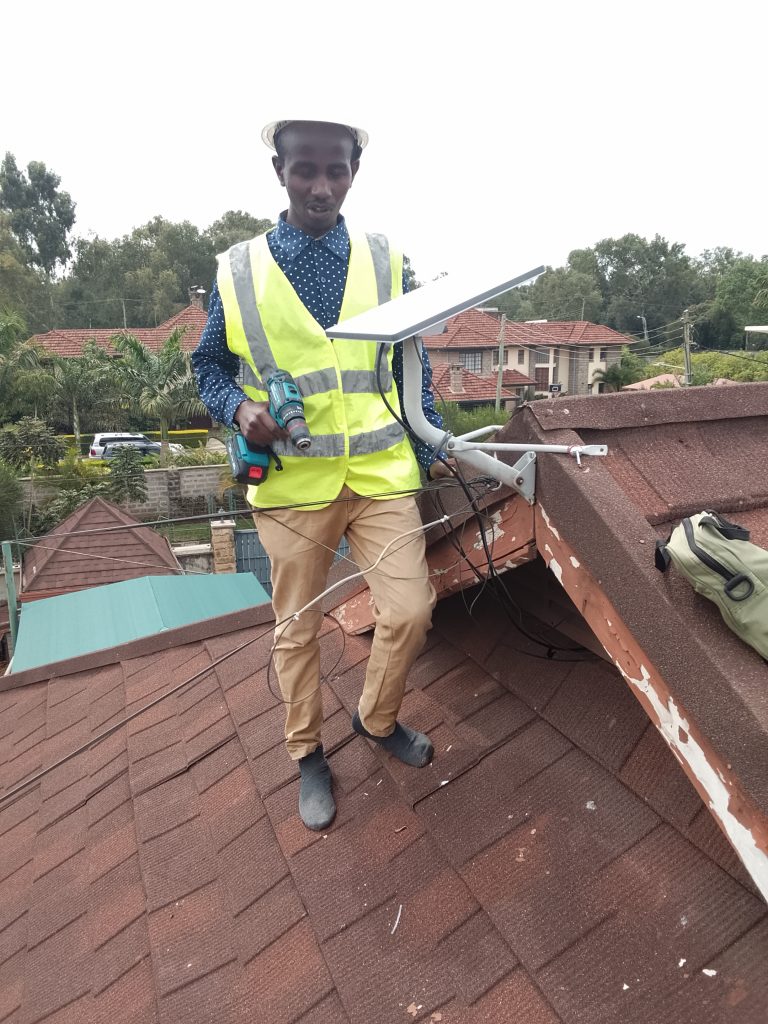
Accredited installation is the foundation of a reliable Starlink experience. The difference between stable, high-performance internet and constant troubleshooting often comes down to how the system is installed. Professional installers ensure correct dish positioning, secure mounting, protected cabling, and optimized indoor networking from the start. These steps prevent signal interruptions, structural damage, and hidden installation flaws that can reduce performance over time. Choosing accredited installation is not an optional extra—it is the key to unlocking the full potential of your Starlink investment.
The long-term benefits of professional setup extend far beyond day one. A properly installed system lasts longer, performs more consistently, and requires fewer repairs. Weather-resistant mounting, clean cable routing, and engineered network design protect both the equipment and your property. Businesses gain uptime protection and operational stability, while homes enjoy seamless streaming, work, and connectivity across every room. Instead of reacting to problems, professional installation prevents them—saving money, time, and frustration in the future.
If you want Starlink that works exactly as it should, the smartest next step is to work with trusted experts. Contact Spacelink Kenya to schedule a professional installation designed for performance, safety, and long-term reliability. Whether for a home, office, or enterprise environment, expert installation ensures your connection is fast, stable, and built to last. Don’t leave your connectivity to chance—partner with professionals who treat your internet as critical infrastructure.
-1770731386.jpg)




 Accredited installation is the foundation of a reliable Starlink experience. The difference between stable, high-performance internet and constant troubleshooting often comes down to how the system is installed. Professional installers ensure correct dish positioning, secure mounting, protected cabling, and optimized indoor networking from the start. These steps prevent signal interruptions, structural damage, and hidden installation flaws that can reduce performance over time. Choosing accredited installation is not an optional extra—it is the key to unlocking the full potential of your Starlink investment.